How to Build an Agentic System: A Practical Guide for Engineering Teams

Why Agentic Systems Matter Now
A chatbot answers questions. A RAG pipeline retrieves documents and summarizes them. An agentic system does something different: it takes actions—queries your database, calls an API, creates a ticket, restarts a service—based on a goal you give it.
For mid-market engineering teams (roughly 20–50 employees), this is the shift from "AI that talks" to "AI that works." You don't need a dedicated AI research team. You need a clear architecture, a small set of tools, and the same operational discipline you already apply to web apps and APIs.
This guide walks through how to build an agentic system from scratch—what to build first, what to defer, and what separates a demo from something you can run in production.
What Makes a System "Agentic"
An agentic system has four properties:
- Goal-driven: You give it an objective ("find why checkout failed for order #4821"), not a script of steps.
- Tool-using: It calls functions, APIs, or MCP servers to gather information and act on the world.
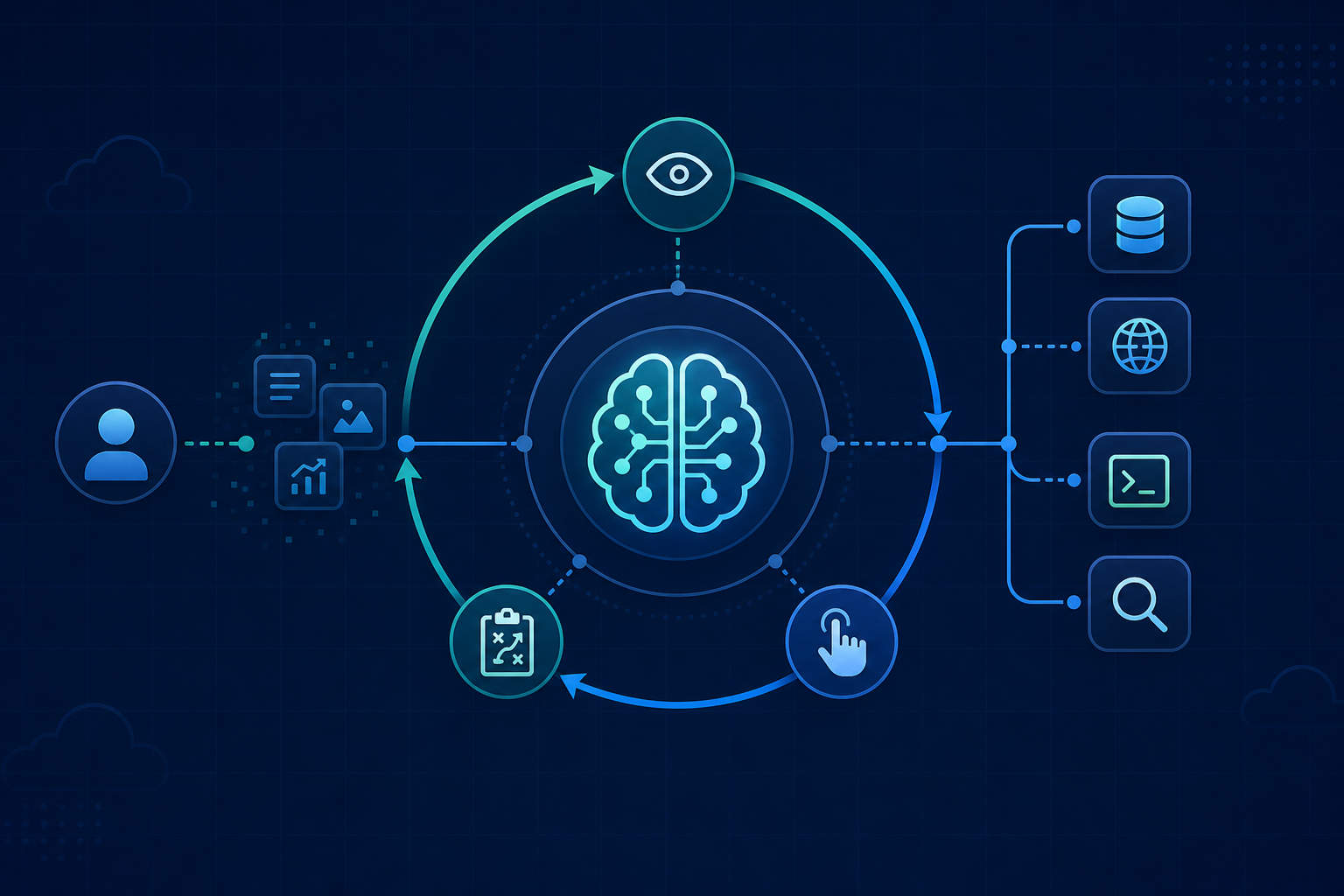
- Iterative: It runs a loop—observe, reason, act, observe again—until the goal is met or it escalates.
- Bounded: It operates within limits you define: which tools it can use, what it can modify, when it must stop and ask a human.
If your system only calls an LLM once and returns text, that's not agentic. If it runs a multi-step loop with tool calls and memory, it is—even if the loop is only three steps.
Agentic System vs Chatbot vs RAG
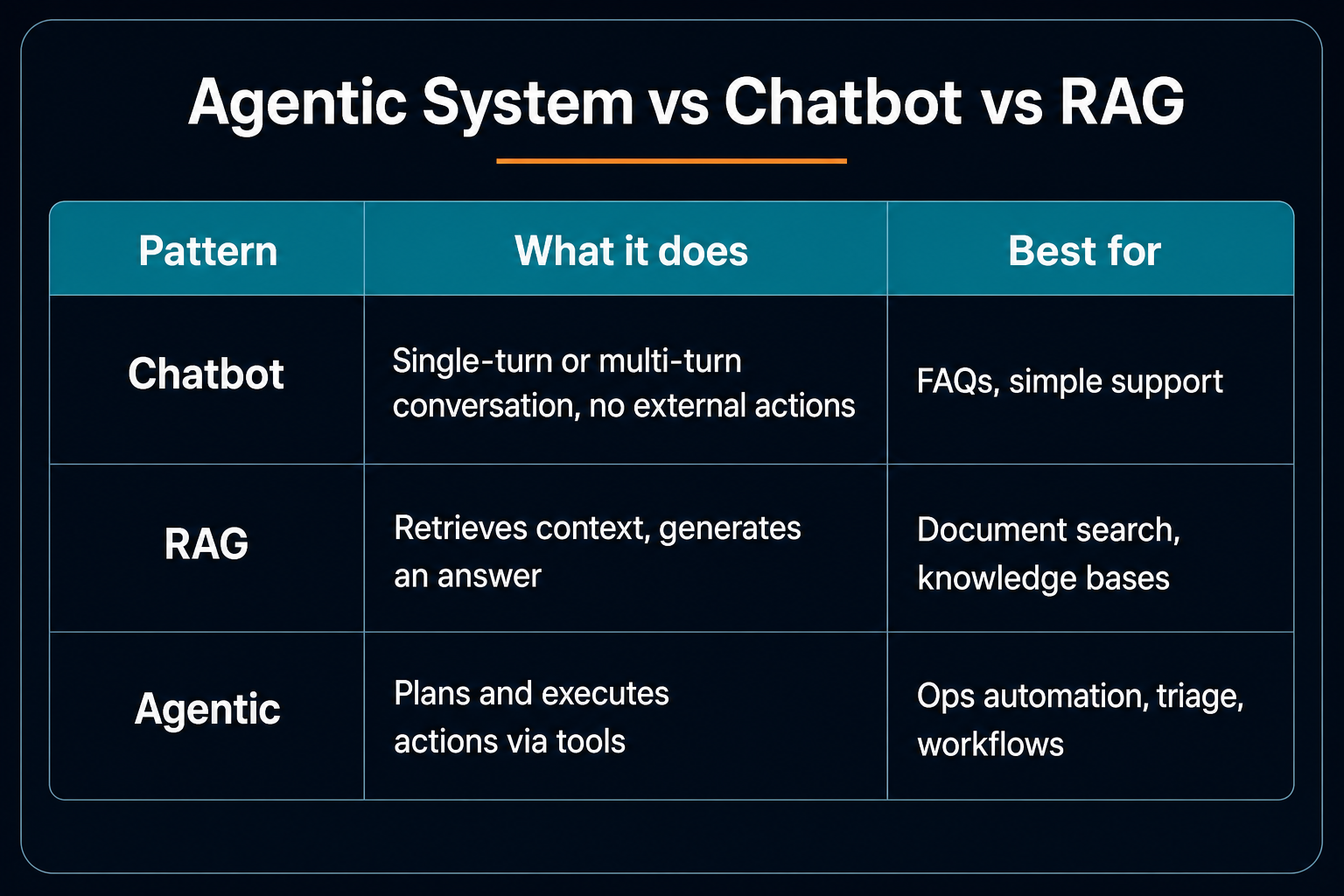
Many production systems combine all three: RAG for context, tools for action, conversation for the user interface. The RAG stack with Postgres and Lambda is a solid retrieval layer; agents sit on top of it.
Core Architecture
Every agentic system shares the same building blocks:
1. The LLM (reasoning engine)
The model decides what to do next: call a tool, ask for clarification, or return a final answer. You don't need the largest model—a capable mid-tier model with good tool-calling support is enough for most internal workflows.
2. Tools (the hands)
Tools are typed functions the agent can invoke: search_orders, get_server_logs, create_jira_ticket. Each tool has a name, a description (the model reads this to decide when to use it), and input parameters.
Keep tools small and composable. One tool that does "investigate incident" is hard to debug. Three tools—fetch_metrics, search_logs, list_recent_deploys—give the agent flexibility and give you observability.
3. The agent loop (orchestration)
The loop is the heart of the system:
User goal → LLM reasons → Tool call? → Execute tool → Feed result back → LLM reasons → ... → Final answer
You cap iterations (e.g. 10 steps) to control cost and prevent runaway loops. When the cap is hit, the agent escalates to a human.
4. Memory (short and long term)
- Short-term: The conversation and tool results within the current session.
- Long-term (optional): User preferences, past resolutions, or embeddings for retrieval. Start without it; add when a real use case needs continuity across sessions.
5. Guardrails
Rules that run outside the model: block destructive actions, require approval for writes, redact PII from logs, enforce spend limits. Guardrails are code—not prompts. What nobody tells you about AI agents in production covers why this layer matters more than model choice.
Step-by-Step: Build Your First Agent
We'll build a minimal support-triage agent in TypeScript. It reads a customer message, searches orders, and drafts a response.
Step 1: Define your tools
const tools = [
  {
    name: "search_orders",
    description: "Search orders by customer email or order ID",
    parameters: {
      type: "object",
      properties: {
        query: { type: "string", description: "Email or order ID" },
      },
      required: ["query"],
    },
  },
  {
    name: "get_order_status",
    description: "Get shipping and payment status for an order",
    parameters: {
      type: "object",
      properties: {
        order_id: { type: "string" },
      },
      required: ["order_id"],
    },
  },
];
Implement the actual functions behind these tools—they call your database or internal API.
Step 2: Implement the agent loop
async function runAgent(userMessage: string, maxSteps = 8) {
  const messages = [
    {
      role: "system",
      content: `You are a support triage agent. Use tools to look up order info.
Never invent order details. If you cannot find data, say so and escalate.`,
    },
    { role: "user", content: userMessage },
  ];

  for (let step = 0; step < maxSteps; step++) {
    const response = await llm.chat({ messages, tools });

    if (response.tool_calls?.length) {
      for (const call of response.tool_calls) {
        const result = await executeTool(call.name, call.arguments);
        messages.push(response.message, {
          role: "tool",
          tool_call_id: call.id,
          content: JSON.stringify(result),
        });
      }
      continue;
    }

    return response.content; // Final answer
  }

  return "I could not resolve this within the step limit. Escalating to a human.";
}
This pattern works with OpenAI, Anthropic, or any provider that supports tool/function calling.
Step 3: Connect real backends
Replace mock implementations with real data sources. Start read-only: search and fetch, no writes. Once retrieval is reliable, add write tools (create ticket, update status) behind approval gates.
Step 4: Add observability from day one
Log every step: input, tool called, tool result, tokens used, latency. You'll need this when something goes wrong—and it will. Structured logs beat replaying conversations from memory.
Connecting Tools with MCP
Building one-off tool wrappers per integration doesn't scale. The Model Context Protocol (MCP) standardizes how agents discover and call tools exposed by external servers.
Instead of hardcoding search_orders in your agent, you connect an MCP server that exposes your CRM, database, or internal CLI. The agent sees a catalog of tools at runtime. When you add a new MCP server, the agent gets new capabilities without code changes in the orchestration layer.
For mid-market teams, MCP is especially useful when:
- Multiple agents need the same integrations
- You want non-engineers to expose tools via a standard interface
- You're connecting to systems you don't own (IDEs, cloud consoles, ticketing)
Production Patterns That Actually Work
Start with one narrow workflow
Don't build "the company AI." Pick one painful, repetitive task: triage inbound support emails, summarize overnight alerts, or pre-fill incident reports. Ship that. Learn. Expand.
Human-in-the-loop for writes
Let the agent draft; let a human approve before anything mutates production data. Gradually automate low-risk actions as confidence grows.
Evaluation before deployment
Build a golden dataset: 20–50 real scenarios with expected tool calls and outputs. Run the agent against it after every prompt or tool change. LLM behavior shifts; your eval suite catches regressions.
Cost controls
Every reasoning step and tool call costs tokens. Set per-request budgets, use smaller models for routing, and cache retrieval results. We've seen bills spike when agents "think out loud" without limits.
Escalation is a feature
A good agent knows when to stop. Define clear escalation triggers: missing data, ambiguous intent, high-risk action, step limit reached. Escalation to a human is success—not failure.
What to Build vs Buy
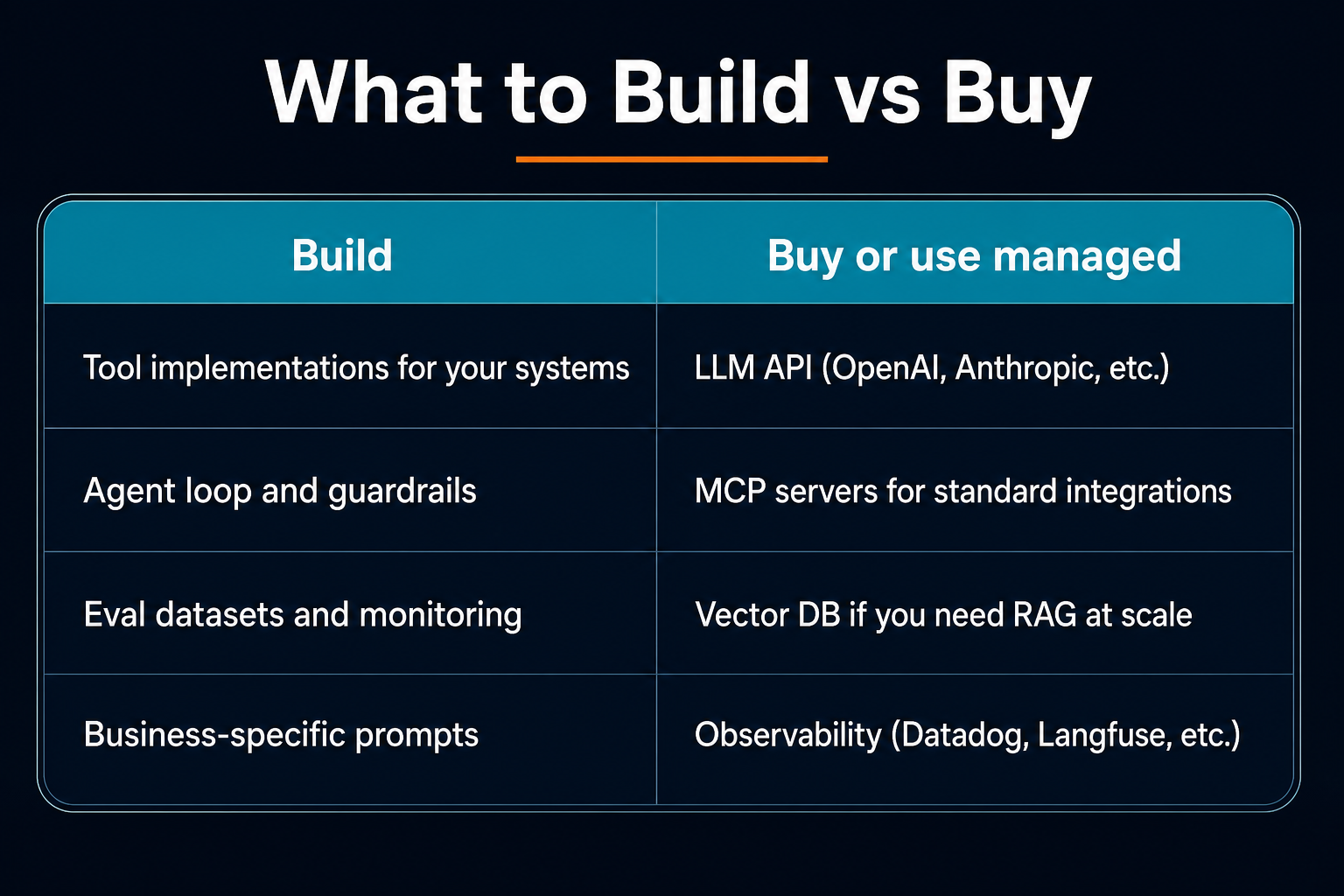
You don't need LangChain, CrewAI, or a multi-agent framework on day one. A 50-line loop with direct API calls is easier to debug and often enough for a first production agent.
When to Add Multi-Agent Patterns
Multi-agent setups—one agent plans, another executes, a third reviews—add coordination overhead. Use them when:
- Tasks genuinely require specialized roles (research vs code vs review)
- A single agent's context window gets overloaded
- You need parallel workstreams with merge logic
For most mid-market use cases, one well-tooled agent beats three loosely coordinated ones.
Checklist Before Production
- Tools are read-only or write actions require approval
- Step limit and token budget configured
- Every run logged with tool calls and outcomes
- Golden eval set passes after changes
- Escalation path defined and tested
- PII and secrets never sent to the model unredacted
- Cost alerts configured
Conclusion
Building an agentic system is not magic—it's engineering. Define a goal, expose small tools, run a bounded loop, add guardrails, and observe everything. Start narrow, ship to one workflow, and expand when production teaches you what breaks.
If you're exploring AI agents for business operations, the same principles apply: observe, reason, act—within limits your team defines. The teams that succeed treat agents like any other production service: boring, observable, and incrementally improved.
Need someone to run this?
DevOps retainers with infrastructure monitoring, CI/CD, and clear monthly packages—from $500/mo.
See pricing